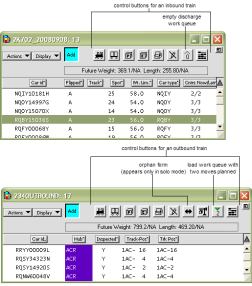
You use the elements in a train window to perform various planning tasks and change the layout of information in so that it is convenient to your terminal:
Actions drop-down list (with inbound trains) (on page 1)
Actions drop-down list (with outbound trains) (on page 1)
Add icon (on page 1)
Control buttons available in a train window (on page 1):
Train
Car Scan
Planned Container
Current Container
Edit (also known as "Pencil")
Load List
Discharge Queue (inbound only)
Load Queue (outbound only)
Track Plan
Attribute column headers (on page 1)
For quick reference in the XPS client, you can position the cursor over a control button or icon and see a short description in the status box at the top of the XPS toolbar (right of center).
For information about how to change the attribute columns or sort the columns differently, see Working with lists views.